

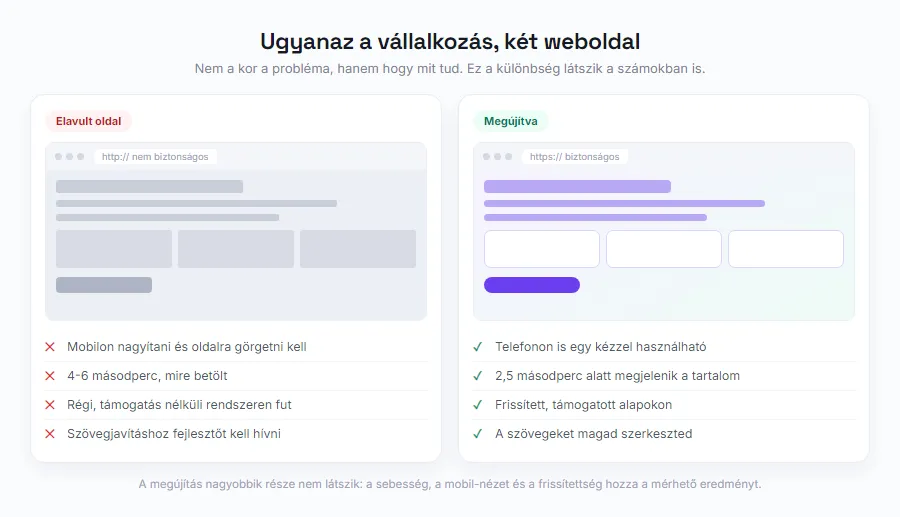
Your website does not break down overnight. It ages slowly: first the design starts to look dated, then things fall apart on mobile, and one day you realize that not a single enquiry has come through it in months. This kind of wear is dangerous precisely because there is no single moment when it becomes obvious.
The advice circulating online says you should “build a new one every two to three years”. It is a convenient rule, except the calendar is not what decides. Some sites still do their job properly after six years, and some would be better off replaced after eighteen months.
In this article we walk through the signs that genuinely tell you it is time to act: what Google measures, what your mobile numbers show, what happens under the hood, and at what point all of this has been a legal obligation for some businesses since 2025. At the end comes the most important decision: refresh or rebuild?
How long does a website “live”?
There is no single number that answers this question, and it is worth saying so right at the start. An Orbit Media Studios analysis compared archived versions of 50 leading marketing websites and measured an average redesign cycle of 2 years and 1 month. The same company measured 6 years and 4 months across 78 of its own client sites. Same yardstick, same method, a threefold difference.
The explanation is not a contradiction but the sample itself: a marketing agency's own website is a marketing tool in its own right, so it gets renewed often. A well-maintained company brochure site, on the other hand, keeps doing its job for years without anyone noticing. In a Databox survey of 145 small and medium businesses, 49% had completely redesigned their site within two years - but that is a habit, not a command.
The industry matters too: in fast-moving fields (marketing, tech, fashion, hospitality) a look can go stale in 18-24 months, while in construction, legal services and local trades 3-5 years is entirely realistic with good maintenance.
So the right question is not how old your site is. It is whether it is still working for you. The next eight signs answer exactly that.
8 signs it is time to act
It helps to sort the signs into three groups, because they show up in different places. The first group is noticed by your visitors, the second shows up in your numbers, and the third is seen by no one - until it turns into a problem.
What your visitors see. The site falls apart or is awkward to use on mobile; it loads slowly; the design visibly belongs to a previous decade; and the most expensive one of all: it no longer sells what you actually do today. That last one is the most common silent failure. The business evolved, new services arrived, old ones dropped away, but the website stayed where it was three years ago.
What your numbers show. No enquiries have come through the site in months; most visitors leave after the first screen; or in Google Search Console you can see your impressions declining. If you have no measurement at all, that is a sign in itself: Search Console is free and takes ten minutes to set up.
What no one sees. There is no HTTPS, or the browser shows a warning; the system and plugins have not been updated in months; and you cannot edit the site yourself, so every tiny text change means calling a developer. That last one is not a technical problem but a business one: if pushing through a price change takes two weeks and an invoice, your website is not an asset, it is a burden.

It is decided on mobile
If you check only one thing from this article, make it this one. According to the Hungarian media authority NMHH's 2025 household survey, 96% of Hungarian internet users go online on a smartphone, compared with 73% on a laptop and 52% on a desktop. 78% of internet users use both a handheld device and a computer, and average daily time online is 4.7 hours.
Google has adapted to this: for years it has used so-called mobile-first indexing, meaning it crawls and ranks the mobile version of your site. This has a consequence that surprises many people: if some content does not appear on mobile (because an old template hides it on smaller screens), then as far as Google is concerned that content effectively does not exist.
A two-minute self-test: open your own site on your phone and try to do exactly what you expect a customer to do. Find the price, fill in the contact form, call the phone number with a single tap. If along the way you have to zoom in, scroll sideways, or you cannot find the button, you have your answer.
A slow site brings fewer customers
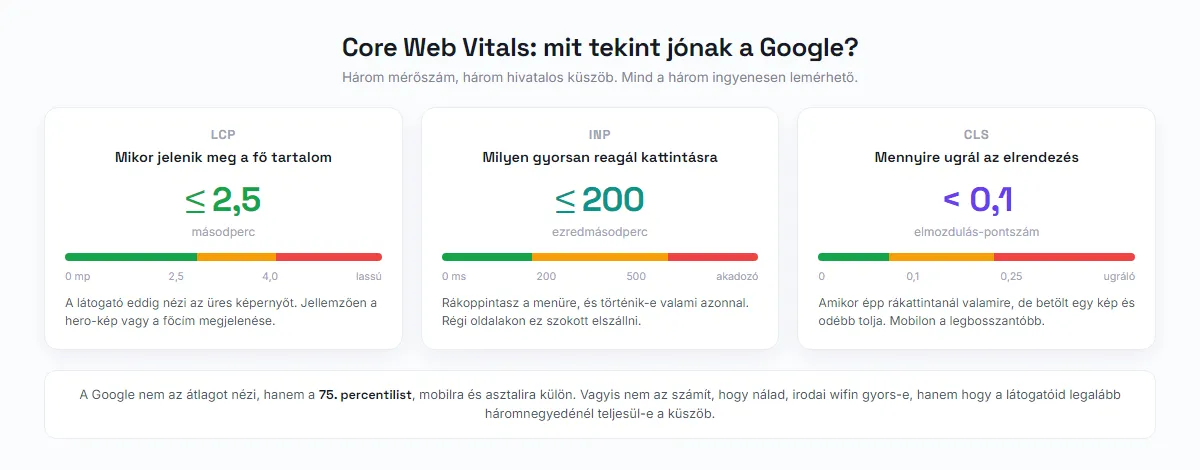
Speed has an official yardstick. Google uses three metrics under the name Core Web Vitals, and for each of them it has defined what counts as good: the main content should appear (LCP) within 2.5 seconds, the response to a tap or click (INP) should take at most 200 milliseconds, and layout shift (CLS) should stay below 0.1.
One detail that misleads a lot of people: Google does not look at the average but at the 75th percentile, measured separately for mobile and desktop. In other words, it does not matter whether the site feels fast for you, on office wifi, with a warm cache. What matters is whether the threshold is met for at least three quarters of your visitors - typically on a mobile network, on a weaker phone.
Checking is free: Google PageSpeed Insights measures any URL, and Search Console provides a dedicated Core Web Vitals report for your whole site. If you see red fields there, it is not a matter of aesthetics: visitors to a slow site simply hit the back button before they see anything of you at all.
What you cannot see: outdated technology
The software running behind a website has an expiry date. PHP, which powers the vast majority of Hungarian websites, is supported version by version: 8.1 reached end of life at the end of 2025, 8.2 expires at the end of 2026 and now receives security fixes only. Anyone still on PHP 7 has been running with unpatched vulnerabilities for years.
With WordPress sites, the risk is not in the core. According to Patchstack's 2025 security report, 96% of reported vulnerabilities originated in plugins and only 4% in themes. The same report also showed that in more than half of the cases, the plugin's developer had not shipped a fix by the time of disclosure.
The consequence is rarely spectacular, but always expensive. A hacked site starts serving spam content, Google flags it, visitors get warnings, and by the time you notice, part of your search visibility is gone. Recovery typically costs more than regular updates would have.
This is the least visible but best-yielding part of any refresh: nothing changes on the outside, but your website stops being a ticking time bomb.
Since 2025, for some sites it is also a legal obligation
Surprisingly little is said about this, yet it has been in force since June 28, 2025: the European Union's accessibility directive (European Accessibility Act, (EU) 2019/882) was transposed in Hungary by Act XVII of 2022 (2022. évi XVII. törvény, the Hungarian Accessibility Act). The essence is that certain consumer-facing digital services must be usable without barriers - in practice, in line with WCAG 2.1 level AA.
The most common misunderstanding is that this applies to every website. It does not: the regulation covers designated sectors that provide digital services to consumers. These include e-commerce, meaning online shops, as well as banking and financial services, telecommunications, ticketing and passenger-information systems in passenger transport, e-books and audiovisual media services. A purely informational website used for getting in touch, where the consumer does not enter into a contract, typically falls outside its scope.
The second important exemption is size: microenterprises (fewer than 10 employees and annual turnover of at most 2 million euros) are exempt from a substantial part of the obligations when providing services. The penalty, however, is not symbolic: fines can reach 5% of annual net turnover.
There are also transitional rules for previously concluded contracts and for equipment already used to provide services, so if you run an online shop and you are not a microenterprise, this is a question to review with a lawyer, not to settle from a blog post. What we can safely say is this: most of accessibility work (a sensible heading structure, readable contrast, alt text on images, forms that work with a keyboard) coincides exactly with what search engine optimization asks for anyway. It is rare for an obligation to bring you traffic at the same time.

Refresh or rebuild?
This is the most important decision in this article, and the answer almost always depends on the foundation, not the surface.
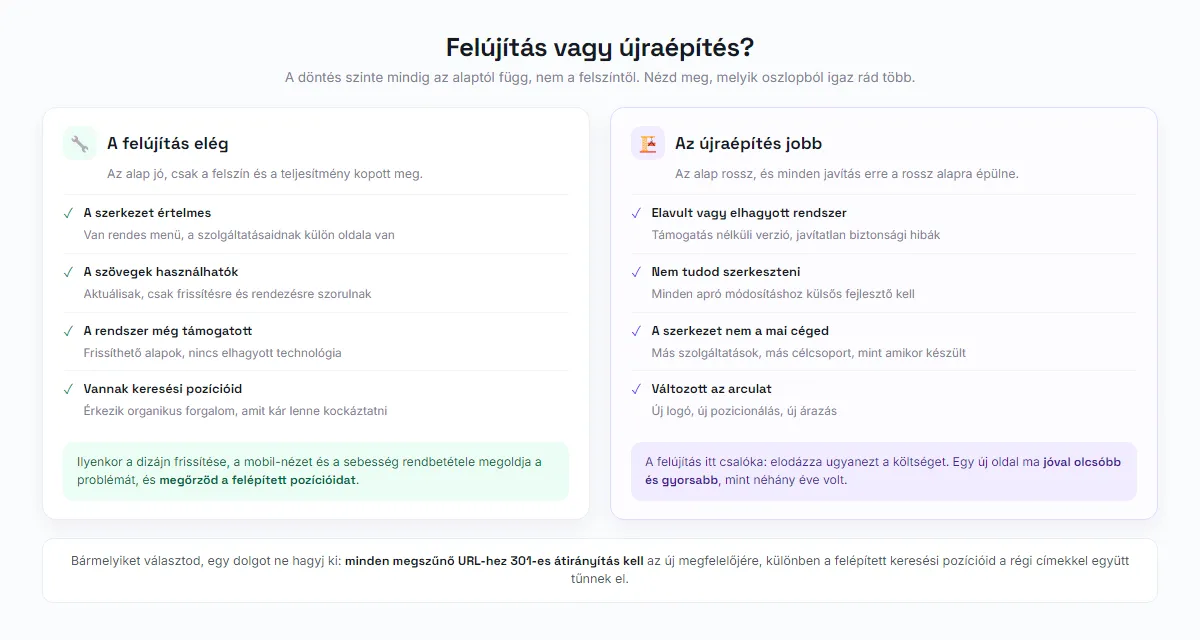
A refresh is enough when the structure is sound: there is a sensible menu, your services have their own pages, the copy is usable, and the system it runs on is still supported. In that case updating the design, fixing the mobile view, optimizing speed and adding a few new features solves the problem - while you keep the search rankings you have built up.
A rebuild is the better choice when the foundation is bad: the site runs on an outdated or abandoned system, you cannot edit it, the structure no longer reflects what you offer today, or your branding and positioning have changed in the meantime. In that case a refresh is deceptive: every new fix is built on a bad foundation, and in the end it costs more than a new site would have.
There is also a practical factor that has shifted the balance in recent years. Building a new site today is far cheaper and faster than it was a few years ago, so the classic argument that “a refresh is always cheaper” is less and less true. If you are curious about the ballpark figures, we wrote about them separately: how much does a website cost.
The most expensive mistake: losing your Google rankings
Whichever path you choose, there is a risk that many people only notice after the fact. If the URLs change during a rebuild and no redirects are set up for them, every old address runs into a 404 error. The external links pointing to them, the ranking equity you have built and the traffic arriving from old search results all disappear at once.
The solution is technically simple - you just must not forget it: every retired URL needs a 301 (permanent) redirect to its new equivalent. A 301 passes on the vast majority of link equity. The most common way to get it wrong is setting up a temporary 302 redirect by mistake, and then nobody understands why the rankings never recover.
A redirect alone is not enough, though. If your new service page came out shorter, the keyword-rich headings dropped out, or the FAQ block that used to earn you a featured result is gone, your position will fall even with perfect redirects in place. It is the content that carries the ranking, not the URL.
We cover this in more depth in our SEO 2026 article, and setting up measurement in the Search Console guide.
Frequently asked questions
How much does a website refresh cost?
Refresh or a completely new site: which is cheaper?
Will I lose my Google rankings if I build a new site?
Is making my website accessible mandatory?
Is it enough to just replace the design?
📚 Sources
- NMHH (Hungarian media authority): consumer survey of the electronic communications market, 2025 - residential internet use
- Google web.dev: Web Vitals - the Core Web Vitals thresholds
- Google Search Central: Core Web Vitals and search results
- EUR-Lex: Directive (EU) 2019/882 of the European Parliament and of the Council (European Accessibility Act)
- National Legislation Database (Nemzeti Jogszabálytár): Act XVII of 2022 (2022. évi XVII. törvény) on accessibility requirements for products and services
- Patchstack: State of WordPress Security 2025
- Orbit Media Studios: website lifespan analysis (50 marketing sites and 78 client sites)
- Databox: website redesign survey of 145 small and medium businesses
Let's see what your website actually needs
Not every site needs to be thrown away, and not every site is worth patching up. We will look at your current site's mobile view, speed and technical condition, and tell you whether a refresh or a rebuild will get you further.
Improve an existing website