

If you run a local business, there is one free tool that brings in more than all your other online efforts combined: the Google Business Profile. It is what shows up about your company on the right side of the search results, and it is what people see on Google Maps.
Yet a surprising number of small businesses either never set it up, or configured it years ago and never touched it since. Meanwhile the opening hours are outdated, the phone number is old, and searchers end up calling the competitor instead.
In this article we walk through how to create and verify your profile (this has worked differently since 2022 than most guides claim), what the three factors are that Google officially names for local ranking, which single setting moves the needle the most, and what the most common mistakes are.
What exactly is it, and where does it show up?
The Business Profile is Google's current name for what many people still search for as “Google My Business”. The old name was retired in November 2021; since then it has officially been the Google Business Profile.
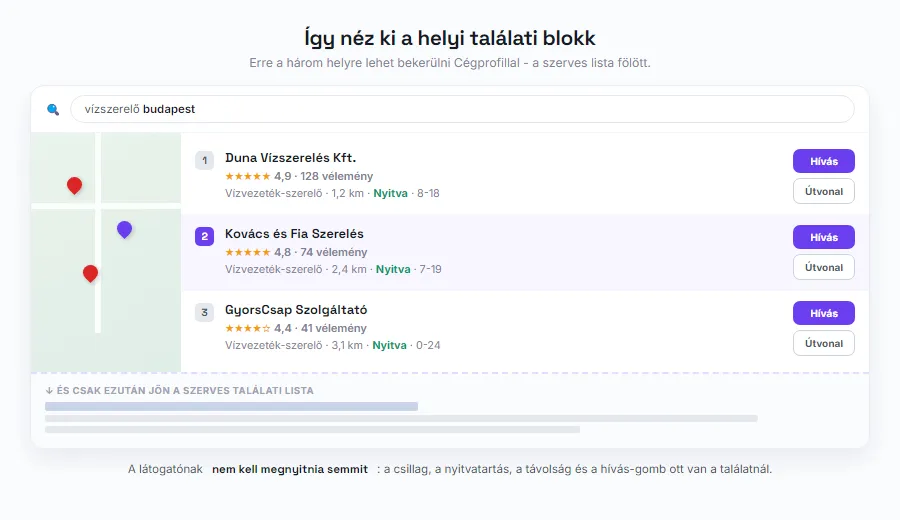
It appears in three places, and all three are moments of buying intent. The first is the panel on the right side of the search results when someone searches for your company name. The second is the local pack: the map box with three results that appears at the top of the list for searches like “plumber budapest”. The third is Google Maps itself, where people check opening hours, directions, and phone numbers.
The last two are what matter. A business that makes it into the local pack appears above the organic result list, with the call and directions buttons right there next to it. This is the shortest path from a search to a customer that we know of today, and it costs nothing.
Two things are worth connecting here. One: visitors coming from Maps almost always arrive on a phone, so if they click through to your site, everything needs to work on mobile there too. Two: AI answers to local questions draw on this same data, so your profile is no longer just about map results. More on that here: how to get into AI answers.
Your profile may already exist - you just don't manage it
Before you create a new one, search for your own business on Google Maps. It is surprisingly common that a listing already exists that you never created: Google can assemble a basic profile from multiple sources, and users can suggest data for it as well.
If you find one, do not create another next to it - a duplicate only causes trouble. Instead, claim the existing one: the process starts from the “Claim this business” style link on the profile, followed by the same verification as for a new profile.
This matters because an unmanaged profile can carry wrong data for years. Outdated opening hours, an old phone number, a wrong category - and visitors see all of it as your business.
Creating and verifying: it has worked differently since 2022
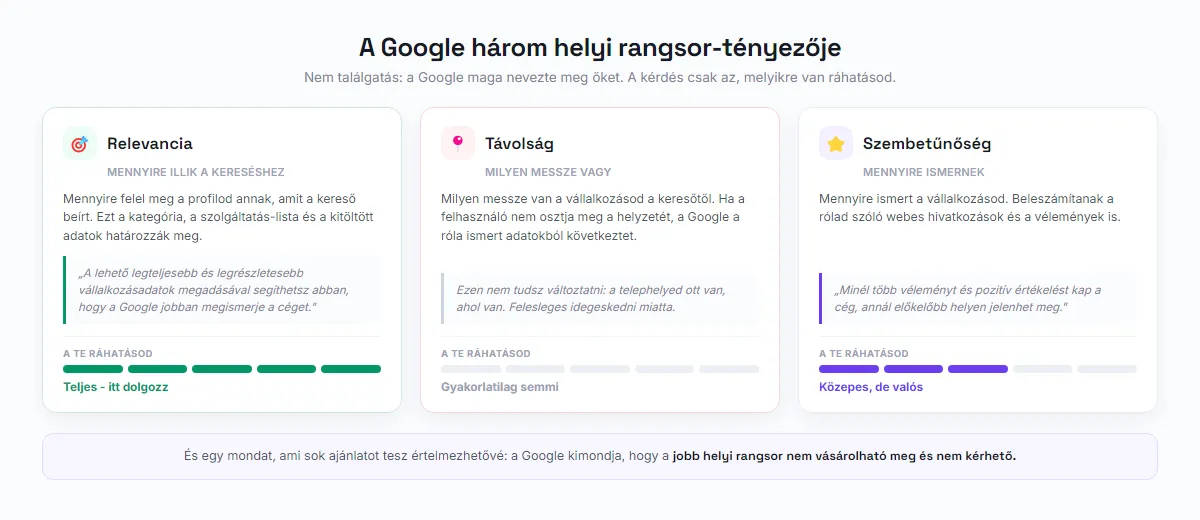
Let's start with the most common misconception. Many guides still tell you to download an app. The standalone Google My Business mobile app was shut down in July 2022. If you look for an app today, you won't find one.
For a single-location business, this is how it works now: you sign in to your Google account, search for your own business in Search or open it on Maps, and the editing buttons appear right there inside the result. There is no separate dashboard. (The “Business Profile Manager” interface still exists, but it is mainly for companies with many locations.)
Then comes verification, and here is the other thing worth knowing in advance. Google uses four methods: phone or SMS, email, live video call, or a postcard mailed to your address with a code. What many people don't know: the help docs state explicitly that the verification methods are determined automatically by Google and cannot be changed. In other words, you don't get to choose, and there is no point hunting for a “why can't I get an SMS” setting.
Verification takes up to five business days, though in some cases it is instant. If you are assigned live video verification, be prepared: you must be physically at the business location, show the premises on camera, prove that you run the business, and all of this happens only during opening hours.
What moves you up? Google's three factors
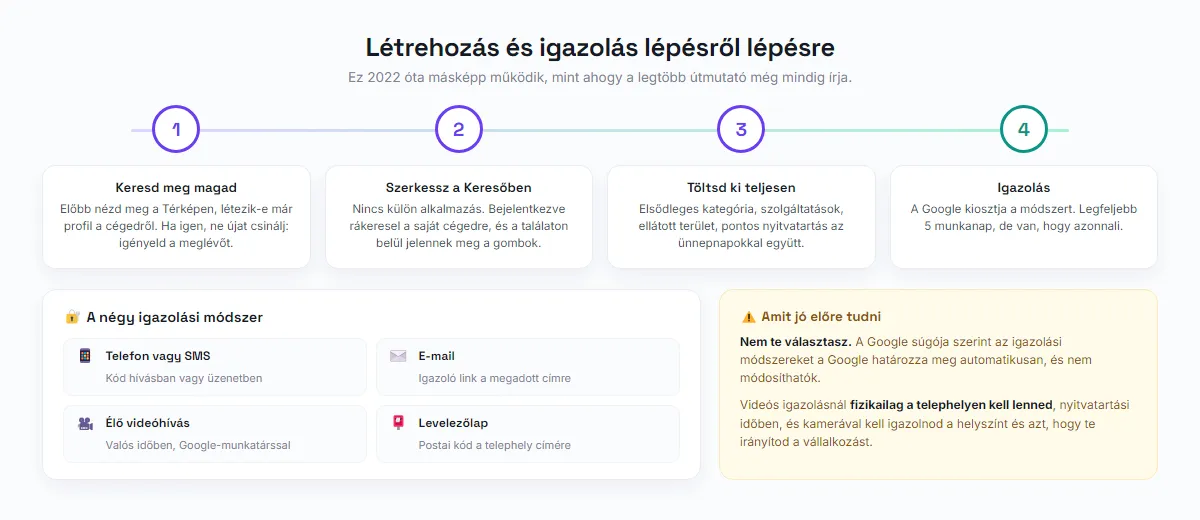
There is endless speculation around this topic, even though Google has publicly stated what it uses to rank local results. There are three factors, and it pays to know which ones you can influence.
Relevance: how well your profile matches the search. In Google's own words, providing complete and detailed business information helps Google better understand your business. You have full control over this.
Distance: how far you are from the searcher. If the user doesn't share their location, Google infers it from what it knows about them. You have practically no control over this, so there is no point worrying about it.
Prominence: how well known your business is. This includes web references about you as well as reviews. Google says it plainly: more reviews and positive ratings can improve your business's local ranking. You have moderate but real control over this.
And one sentence worth memorizing, because it puts a lot of sales pitches in perspective: Google states that a better local ranking cannot be bought or requested. Anyone who promises a guaranteed local number one spot is selling something they don't have.
Local results are a separate lane of search: we covered the other organic ranking factors (content, links, technical foundations) in our SEO 2026 article.
The single most powerful lever: the primary category
If you set only one thing on your profile with care, make it the primary category. This tells Google what you actually are, and it is the strongest factor in deciding which searches you can even compete for.
The typical mistake is a category that is too broad. If you pick your exact trade instead of “business” or “service provider”, your relevance jumps. But if you go too narrow, you fall out of broader searches - so use the secondary categories as well for the activities you genuinely perform.
A practical way to find your category: look up the three competitors on Maps that rank ahead of you for your keywords, and check which category they run under. This is public data, and it often explains the ranking instantly.
Beyond the category, fill in the rest of the fields too: the list of services, the service area, exact opening hours (including holiday exceptions), payment methods, accessibility. Every completed field strengthens your relevance.
Reviews: the engine of prominence
Reviews play a double role. On one hand, according to Google itself they directly influence the ranking; on the other, searchers look at the stars in the local pack first, often before the business name.
The good news is that asking for reviews is allowed, and most satisfied customers will happily leave one if asked. The bad news is that paying or rewarding for them is forbidden, and reviews obtained that way can be removed. Don't risk it: a steady flow of genuine reviews is worth far more than a sudden, suspicious wave.
The most commonly missed opportunity is responding. Reply to every review, including the negative ones, calmly and factually. A good response to a negative review often convinces more future customers than ten five-star ones.
Practical tip: the best moment to ask is right after handing over the work or completing a successful service, not a week later.
Photos, posts, questions: keeping the profile fresh
The profile is not a form you fill in once. A few things pay off a lot with regular, small effort.
Photos. Real pictures of the location, the team, and your work. An authentic phone photo performs better than a downloaded, sterile stock image - visitors can tell the difference.
Posts. Short, timely updates: a promotion, a new service, holiday opening hours. You don't need to start weekly content production, but a profile that has been silent for months shows.
Questions and answers. This block is less well known, yet you can post frequent questions yourself and answer them too. It is essentially an FAQ that appears right in the search result. If you already have an FAQ on your website, you can bring the three most important entries over here. We wrote about which questions are worth collecting here: what to write on your website.
Messages and calls. If you turn on messaging, actually respond to it. A message left unanswered for days is worse than never enabling the feature at all.
The most common mistakes
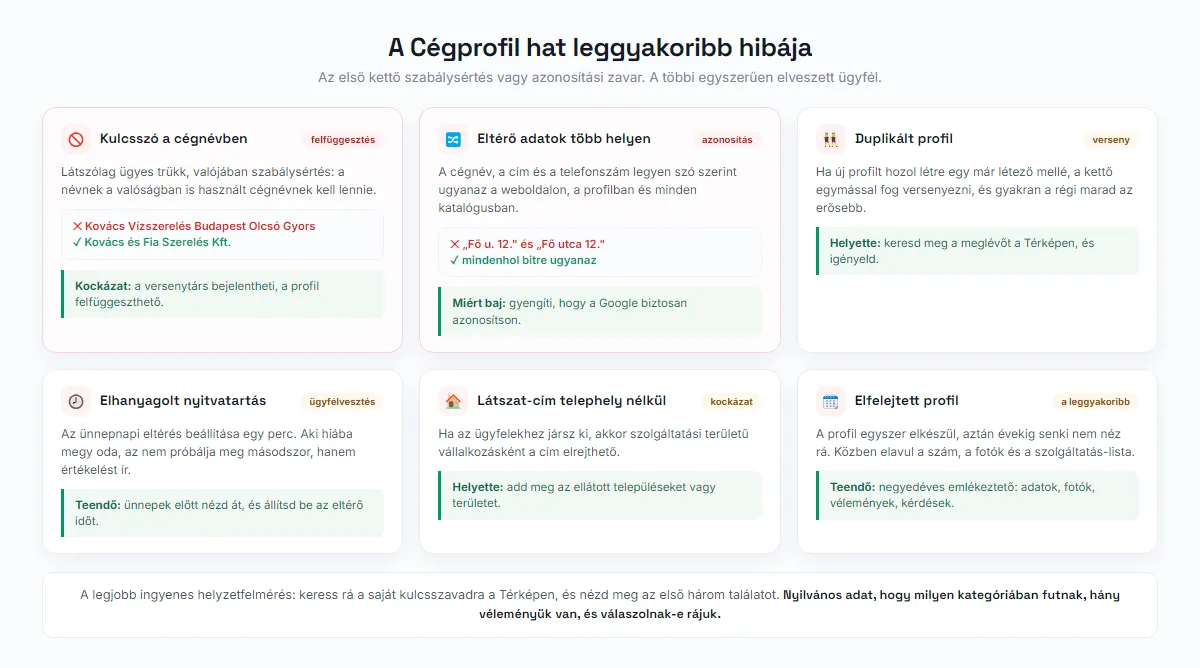
Keywords in the business name. A name like “Kovacs Plumbing Budapest Cheap Fast” looks like a clever trick, but it is actually a policy violation: the name must be the one your business really uses. A competitor can report it, and the profile can be suspended. This is the most expensive shortcut on the list.
Different data in different places. Your business name, address, and phone number should be word-for-word identical on your website, in your Business Profile, and in every directory. Even a seemingly trivial difference (“St.” in one place, “Street” in another) weakens Google's confidence in identifying you.
Neglected opening hours. Setting holiday exceptions takes a minute; skipping it costs a real customer. Someone who shows up to a closed door doesn't try again - they write a review.
Duplicate profile. If you create a new profile next to an existing one, the two will compete with each other, and the older, better-established listing often stays stronger.
No physical location, yet you list an address. If you travel to your customers, set up as a service-area business: the address can be hidden, and you specify the area you serve instead. Listing a fake address is risky.
The forgotten profile. The most common mistake of all is that the profile gets set up once and then nobody looks at it for years. Set a quarterly reminder and review it: data, photos, reviews, questions.
Frequently asked questions
Is the Google Business Profile free?
Do I need a website for it?
How long does verification take?
Can I ask my customers for reviews?
What if I don't have a customer-facing location?
📚 Sources
The profile is done. What about your website?
The Business Profile gets you found. From there, what the visitor finds after clicking through is what decides. Our free SEO analyzer checks your site's technical health, structure, and speed, and gives you concrete to-dos with a score.
Start the free analysis